

How to Avoid a Website Project's Biggest Bottleneck: Stakeholder Communication
You can get a basic website up and running faster than most people think. A capable designer or developer can plan, build, and launch a simple site in as little as 7 days. What usually slows a project down is not the build itself. It's the communication around it.
Once clients, vendors, team members, and decision-makers all get involved, things are likely to slow down quickly. Comments get buried in email threads. Revision requests land in spreadsheets. Screenshots become outdated. Meetings create more follow-up than clarity. Before long, a project that should be moving forward is stuck in a loop of communication and delay.
The good news is that there is a better way to manage a website collaboration before communication creep takes over the project.
We sought a solution and created a plugin.
When our team wanted a smoother way to coordinate with clients on website projects, we developed Annotation Notes to keep comments tied directly to the page. Instead of letting requests drift through scattered messages and disconnected documents, we created this plugin as a simple and effective way to help everyone see what needs to change and where.
Organizing Notes for a WordPress Website: what Annotation Notes does
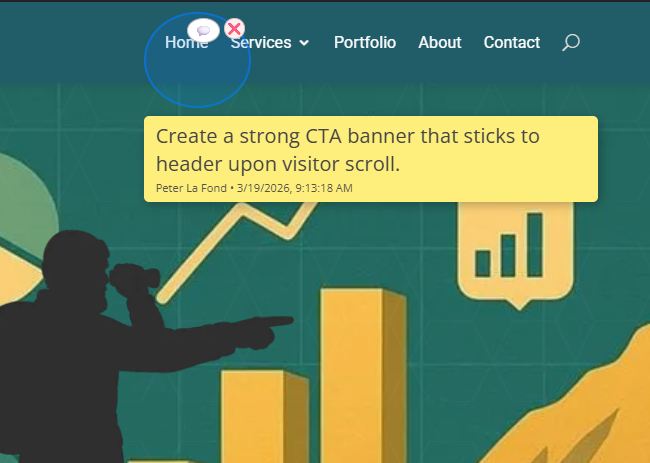
Annotation Notes is a WordPress website annotation plugin that lets designers, developers, agencies, and clients place comments directly on the frontend of a webpage. Instead of relying on scattered emails, PDFs, spreadsheets, screenshots, chat messages, and even Post-It Notes the plugin keeps website design feedback tied to the exact part of a specific page being discussed.
In practical terms, that means your team can use Annotation Notes as a website feedback tool and online proofing system inside WordPress. A user can place a visual note on the page, explain the requested change, and keep that communication attached to the layout itself. That makes website collaboration easier to manage, easier to understand, and faster to act on.
(Screenshot below) Highlight the area, add your comment, and keep project communication in context.
The build is not always what slows a project down
Many delays happen even when the actual build is moving along just fine. The real slowdown often begins when feedback has to move between multiple people across multiple channels. One person wants a change to the homepage banner. Another wants to rewrite a call to action. Someone else thinks the navigation should be reorganized. A vendor is waiting on approval. A client contact has to check with a supervisor before confirming the next step.
Now multiply that by dozens of decisions across an entire website.
That is when communication becomes the bottleneck.
Most client-vendor communication is remote and time-shifted
In the real world, most website projects are not handled with the client contact and the vendor sitting in the same office, looking at the same screen, and making every decision in real time.
More often, project communication involves recommending ideas, commenting on revisions, and asking questions, and that communication is remote and time-shifted. A client marketing manager may send comments late in the afternoon. The agency project manager may not see them until the next morning. The designer may make a revision, but the developer may not implement it until later that day. Then a decision-maker on the client side may need another day or two to review the change, or ask follow-up questions.
That kind of stop-and-start communication is normal in web projects, but it also creates delay—especially scores of feedback requests are open for review. When notes are scattered across multiple channels, the lag gets worse and, at times, information is completely overlooked. People spend more time interpreting, relaying, and confirming information than moving the project forward.
Fragmented communication creates project drag
The problem is not just the amount of communication. It is that the communication is usually scattered.
Website projects often rely on a messy collection of disparate communication tools (i.e., spreadsheets, email threads, screenshots, PDFs, text messages, meeting notes, etc,...). Each communication channel may contain useful information, but taken together they create a workflow bottleneck. Team members spend time hunting for the latest comment, checking whether a request has already been addressed, and trying to determine which version of feedback is current.
That kind of fragmentation quietly eats up hours, and many of those hours are unnecessarily billable.
A spreadsheet may list revision requests, but it does not always show exactly where those changes belong on the page. A screenshot may highlight an issue, but it can become outdated as soon as a new revision is uploaded. An email thread may contain important feedback, but after a dozen replies it becomes difficult to follow. A project manager may relay comments from a client meeting, but some nuance gets lost in translation.
All of this adds friction.
And friction slows everything down. Frustration builds.

Why visual work suffers from disconnected feedback
Web design is visual by nature. That means communication works best when it stays connected to the page itself.
Unfortunately, traditional feedback methods pull comments away from the actual work. A client may say, “Can we tighten this section up?” But which section? A stakeholder may write, “Move this up and make it stronger.” But what does “this” refer to? A vendor may receive a screenshot with arrows and notes, only to realize the page has already changed since that screenshot was taken.
The farther feedback is removed from the live page, the more room there is for confusion.
That confusion creates follow-up emails. It creates clarification calls. It creates extra rounds of revisions. It creates delays that were never part of the original build schedule.
A simple five-minute adjustment can easily turn into days of back-and-forth if the request is not clear the first time.
Website collaboration at different stages of a project
Annotation Notes is useful because it is not limited to one moment in the project. It can be a communication asset across multiple phases of the build.
Discovery and planning
During early planning, the plugin can be used to identify layout priorities, content placement questions, and structural ideas directly on a draft page.
Design review
During design review, it helps clients and internal teams point to exact visual areas that need revision without relying on vague descriptions.
Development and QA
During development and QA, it gives teams a more direct way to flag spacing issues, image swaps, content edits, and punch-list items on the live layout.
Final approval and post-launch maintenance
During final review and post-launch updates, it provides a cleaner way to document remaining requests, maintenance notes, and follow-up items.
That flexibility is part of what makes the plugin valuable. It supports website communication throughout the project, not just at the very end.
Real-world example: Agency homepage revision
A small agency delivers a homepage draft to a client. The client’s marketing contact likes the page overall, but wants the hero headline shortened, a testimonial moved higher, and the primary button text changed. Instead of sending an email with three loosely described requests, the client drops three notes directly on the page.
The designer sees the exact areas being referenced. The developer knows which button needs updating. The project manager can review the notes later from the backend log. What could have turned into a long chain of clarification emails becomes a short, two-minute review cycle.
Real-world example: Remote vendor and internal team review
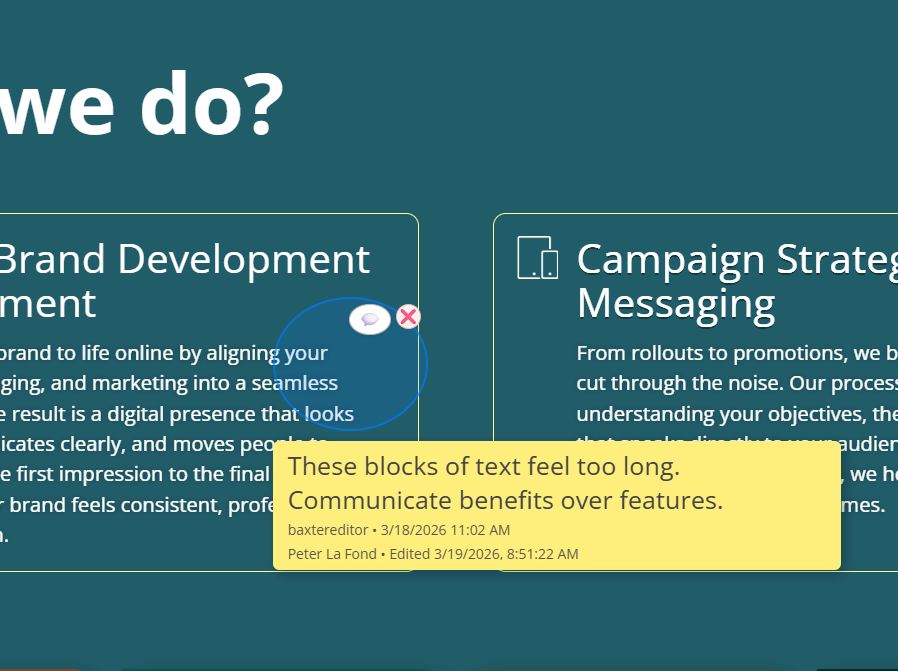
A company has an outside web vendor building a landing page while the internal marketing team, sales manager, and company owner all review progress from different locations. One person notices spacing problems. Another wants a content block moved. The owner wants the call to action changed.
Without a shared on-page system, those comments would likely show up in emails, texts, and screenshots at different times. With Annotation Notes, each person can see the page, place a note in context, and help the vendor understand exactly what should change. That reduces confusion and shortens the path to approval.
The hidden cost of poor communication
Most teams underestimate how expensive communication problems really are.
Poor communication does not just create annoyance. It creates real project costs, including:
- missed deadlines that affect campaigns, inquiries, or sales
- duplicated work
- slower approvals
- extra billable hours spent clarifying comments
- frustrated clients
It also affects the client experience.
When feedback gets lost or misunderstood, clients may feel unheard. When revisions take too long, they may assume the team is disorganized. When team members keep asking follow-up questions to decode scattered notes, it can make the whole process feel heavier than it needs to be.
In other words, communication problems do not stay confined to internal workflow. They shape how professional the project feels from the outside.
Second-order and third-order effects are real
The ripple effects of poor website communication go beyond one delayed edit.
Second-order and third-order effects can include:
-
slower lead generation, customer inquiries, or online sales
-
added strain between the client and the vendor
-
reduced project profitability
-
lower team morale
-
more difficult future collaboration
-
a weaker overall project outcome
Those second-order and third-order effects matter because they are often where the true cost shows up. A single vague comment may seem minor, but the downstream consequences can affect revenue, scheduling, and the overall success of the project.
Annotation Notes helps avoid many of those pitfalls by keeping communication centralized, contextual, and easier to act on the first time.

How Annotation Notes improves website design feedback
Annotation Notes helps reduce communication friction by allowing users to place comments directly on the website page.
That changes the workflow in an important way.
Instead of relying on an email thread to explain where a problem exists, users can communicate on the actual page itself. Designers do not have to interpret instructions separated from the layout. Clients do not have to describe a visual issue in abstract terms. Vendors and team members can see exactly what area is being discussed and respond with speed and specificity.
This system also improves idea sharing. Notes become easier to understand because they are right on the page, not floating in some other software system. Notes are logged in the backend for future reference, giving the project a clearer communication trail over time.
A website feedback tool without bloated pricing
Another advantage is cost.
Many collaboration tools use recurring subscriptions and seat-based pricing. As more people need access, costs can rise quickly, leaving the smallest of teams spending hundreds per year just to keep website communication organized.
Annotation Notes offers a simpler path.
Instead of turning page-level communication into an ongoing seat-based expense, it gives WordPress users a more direct way to manage collaboration without the same kind of rising costs that come with other platforms.
For agencies, freelancers, and small businesses, that matters.
Why WordPress-native control matters
There is also the matter of independence.
Some tools depend on a connection to a vendor’s external server or hosted platform in order to function. That adds another layer of reliance to a process that many teams would prefer to keep simple.
Annotation Notes is designed to keep communication closer to the website itself. That means fewer moving parts, more direct control, and a workflow that stays rooted in WordPress rather than depending on a third-party platform for basic page-level collaboration.
For many teams, that is not a small detail. It is part of what makes the process feel more stable and more manageable.
What this means for your next website project
If your website projects keep dragging out longer than expected, take a close look at how communication is being handled.
If comments are still being spread across emails, spreadsheets, screenshots, PDFs, and chat threads, your communication process may be the real source of delay. The more people involved, the more that friction compounds.
Annotation Notes gives you a practical way to centralize website communication, improve website collaboration, and keep comments tied to the page itself. That helps you reduce confusion, protect project momentum, and make approvals easier for everyone involved.
Ready to improve communication on your website projects?
We originally built Annotation Notes for our own team because we wanted a clearer, faster, and more cost-efficient way to manage website communication. Now we are releasing it to other website builders who want that same advantage in their own projects.
It gives designers, developers, agencies, and clients a direct way to handle website annotation and website design communication inside WordPress, without the bloated recurring costs and outside platform dependence that often come with other tools in this category.
If you are looking for one of the most cost-efficient website annotation plugins of its type on the market, Annotation Notes is built to help you communicate better, reduce project slowdowns, and move websites toward launch with less friction.
Get Annotation Notes today and use it to bring clarity, speed, and structure to your next website project.




0 Comments