

The Upgrade May Look Simple, but the Real Test Comes After You Log In
Your website may look perfectly fine after a Divi 5 migration. The homepage loads correctly. The navigation is intact. The contact button is still in place.
Then you open the builder to update a service page, replace an image, or add a new event. That is when the transition to Divi 5 becomes real.
Moving from Divi 4 to Divi 5 is about more than getting a website through the upgrade process. It is also about making sure the people who manage the site can continue working confidently afterward. A website may function well for visitors while still feeling unfamiliar to the business owner, office manager, marketing assistant, or administrator responsible for keeping it updated.
Divi 5 is a significant rebuild of the Divi platform. According to Elegant Themes, supported Divi 4 content is converted from shortcodes into Divi 5’s newer format during migration, while unsupported modules continue to work through backward compatibility mode.
Because of that, Divi 5 is more than a routine update. The front-end design may look largely the same, but the underlying framework has changed. The editing experience has evolved as well, and some content may be fully converted while other elements continue to rely on legacy systems.
Key Takeaways on Upgrading to Divi 5
- New feature development is now focused on Divi 5. Divi 4 will receive security-related support during the transition period.
- Divi 5 is a structural platform upgrade, not a routine software update. Websites need a formal migration process that includes planning, testing, and implementation time.
- Migration will involve some cost, but for most websites those costs should be far lower than rebuilding the site on a different theme or platform.
- Existing Divi users may recognize parts of the editing experience, but some workflows and tools will require training and adjustment.
- Divi 5 is the better long-term path forward, with improved performance, a modern framework, ongoing feature development, and a stronger foundation for future growth.
- Divi 4 support is not ending immediately. Elegant Themes support has indicated Divi 4 will remain supported until at least Feb. 26, 2027, and possibly longer, while Divi 5 continues toward full stability.
Divi 5 Changes the Work After Launch
It can be tempting to view a Divi 4 to Divi 5 migration as a technical task with a simple checklist. Create a backup. Run the migration. Verify the pages. Move on.
In reality, there is another important step.
A website can pass every visual test and still leave its users unsure about how to manage it. Someone updating business hours or publishing a new event should not have to guess where the editing controls moved. A site administrator should know which pages are safe for routine edits and which rely on shared templates or older modules. Anyone responsible for design updates should know which visual effects and customizations deserve additional testing.
Elegant Themes says Divi 5 includes a redesigned Visual Builder and a new framework designed for improved performance and future development. Those improvements are part of what makes the upgrade worthwhile, but they also mean regular website users may need some guidance as they adjust.
The goal is not to teach every technical detail. The goal is to make sure the people responsible for the website can still use it with confidence.
Key Benefits of Moving From Divi 4 to Divi 5
- Faster performance through a rebuilt framework designed to load pages more efficiently and reduce builder overhead.
- A redesigned Visual Builder that gives Divi a more consistent foundation for future improvements, though existing Divi 4 users may need time to adjust to the updated interface.
- Reduced reliance on shortcodes through Divi 5’s new content architecture, which can make layouts easier to manage and reduce shortcode-related issues in future migrations or redesigns.
- Improved scalability for larger and more complex websites.
- Faster access to new features, since Elegant Themes is now developing new Divi features for Divi 5 rather than Divi 4.
- Since its release, Divi 5 has introduced more than 24 new features that expand design capabilities, improve workflow efficiency, and provide more tools for building and managing modern websites.
The Safe Path Starts Before Migration
Elegant Themes recommends creating a full backup and testing the migration on a staging site before upgrading from Divi 4 to Divi 5. The company also notes that highly customized websites may still encounter migration issues that require attention.
That guidance provides a good foundation for any migration plan.
A staging site creates a safe environment for testing without affecting the live website. It also gives you and your team a place to become familiar with the updated editing experience before making changes on production pages.
Testing should focus first on the areas that matter most to the business. Review the homepage, service pages, contact forms, mobile navigation, and any pages involved in generating leads or sales. WooCommerce stores deserve special attention, as do Theme Builder templates that affect multiple pages across the site.
In My Internet Scout’s experience, some areas of a website may need light reformatting after migration, even when the overall design converts successfully. This is especially true for websites that rely heavily on custom CSS, custom code snippets, advanced design effects, or Divi 4 Theme Builder templates. These elements often work after migration but may require minor adjustments to spacing, alignment, styling, or layout behavior to match the original design exactly.
The more thoroughly these areas are reviewed prior to launch, the smoother the transition will be afterward.
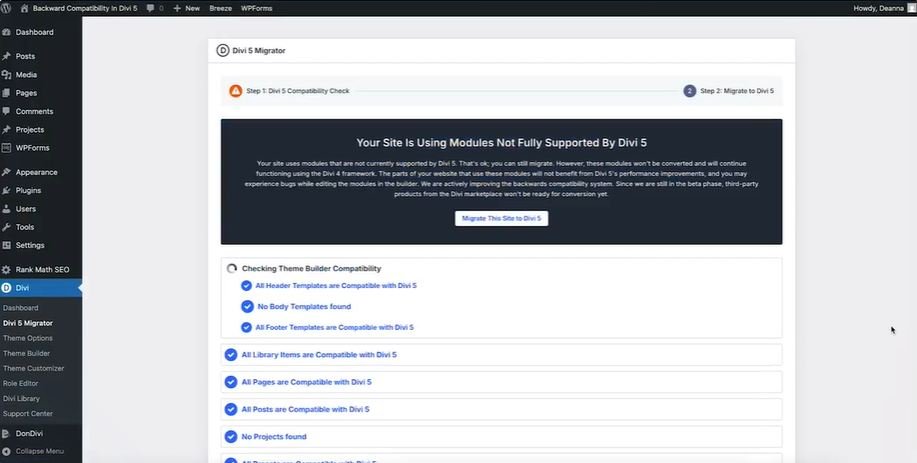
(Below) A screenshot of the Divi 5 Migrator, a tool that helps move a site to Divi 5 and troubleshoot issues along the way.
Backward Compatibility Is Not the Finish Line
Backward compatibility plays an important role in the Divi 5 transition. It allows many existing Divi 4 websites to continue functioning while site owners gradually move toward the newer framework.
Elegant Themes explains that some legacy modules, including certain Marketplace modules, may continue operating through the Divi 4 framework rather than converting fully into Divi 5’s native format.
A successful migration does not necessarily mean every part of the site has been fully modernized. Some elements may continue working exactly as expected while still relying on older technology behind the scenes.
Third-party modules deserve particular attention during planning. Elegant Themes recommends verifying Divi 5 compatibility for Marketplace extensions and other add-ons before migrating. For websites that depend heavily on third-party tools, it may make sense to wait until key extensions are fully supported.
This is also a good opportunity to set realistic expectations. Some websites may require additional cleanup after migration. Certain modules may need updates or replacements. Design effects and animations should be tested carefully rather than assumed to work exactly as they did before.
Plugins should also be tested during migration, even when they do not appear directly tied to Divi. SEO plugins, form tools, caching plugins, WooCommerce extensions, and other add-ons may behave differently depending on how they interact with the theme, templates, or page content. Even when a plugin is listed as Divi 5 compatible, it still needs to be tested on the actual website.
A New Experience Example: Divi 5’s New 'Workspaces' Feature
One example of how Divi 5 is changing the user experience is the introduction of Workspaces, a new feature designed to help users organize the builder around the tools they use most often.
In Divi 4, most users worked within a fixed interface. Divi 5 introduces a more customizable environment that allows users to arrange panels, settings, layers, wireframe views, and other builder tools into layouts that fit their workflow.
For example, a content editor might create a simplified workspace focused on text editing and page updates, while a designer might build a workspace that keeps layers, responsive editing controls, and design settings readily accessible. Teams can tailor the builder experience to match their responsibilities rather than forcing everyone into the same interface.
Workspaces show why training remains important during migration. The website may look familiar after the upgrade, but the tools used to manage it can change significantly. Understanding those changes helps users benefit from Divi 5’s improvements without feeling overwhelmed.
(Below) Nick from Elegant Themes explains how to use the new custom Workspaces feature in Divi 5. Workspaces is a good example of how the user experience has changed since Divi 4.
What to Do Next
Start with an audit before beginning the migration. Identify third-party add-ons, custom CSS, Theme Builder templates, WooCommerce functionality, forms, animations, and any reusable layouts throughout the site.
Prioritize testing for the areas that matter most. Contact forms, navigation, mobile headers, checkout processes, and lead-generation pages should receive attention before lower-priority design elements.
Do not treat February 2027 as a panic deadline. Treat it as a planning window. Divi 4 support is expected to continue at least until then, and possibly longer, but new feature development has already shifted toward Divi 5. That means the smart move is not to rush. It is to start preparing while there is still time to test properly.
Give your team an opportunity to learn the updated workflow before anyone begins editing the live website. Even a simple guide covering common tasks, areas to avoid, and where to get help can make a significant difference.
After launch, continue monitoring important functionality. Check forms, navigation, mobile layouts, plugin interactions, and other areas that may be affected by future updates.
Divi 5 represents an important step forward for the platform, and for many websites it offers clear advantages in performance, flexibility, and future growth. The support timeline gives site owners room to make the move responsibly. With a thoughtful migration plan, careful testing, and a focus on user training, your website can move to Divi 5 without leaving the people who manage it behind.


0 Comments